taalocs Scarf QC: Check Color and Labels
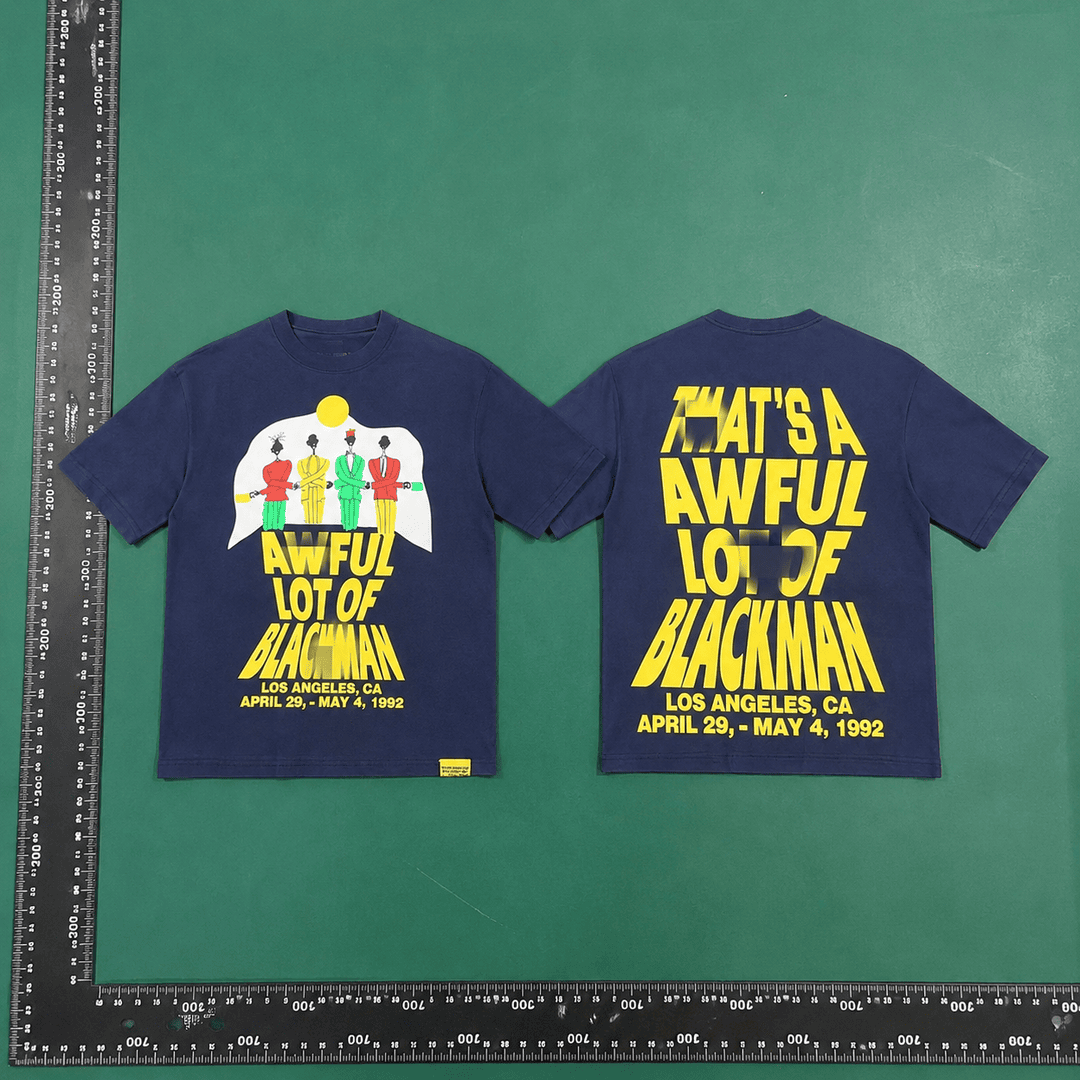
First Confirm: Do These QC Photos Really Correspond to a Scarf? When checking taalocs products, the first step is not to zoom in on the photos, but to confirm that the product page, order variant, and QC photo gallery belong to the same item. The verifiable page title currently is "TAALOCS Multicolor Cotton Print Tee: Loose-Fit Lettering in 26 Color Codes," and the page lists multiple short-sleeve T-shirts, such as black, white, purple, and army green
Editor score 4.2 / 5
Reading contents
First Confirm: Do These QC Photos Really Correspond to a Scarf?
When checking taalocs products, the first step is not to zoom in on the photos, but to confirm that the product page, order variant, and QC photo gallery belong to the same item. The verifiable page title currently is "TAALOCS Multicolor Cotton Print Tee: Loose-Fit Lettering in 26 Color Codes," and the page lists multiple short-sleeve T-shirts, such as black, white, purple, and army green printed versions, not scarves.
Therefore, the image below can only serve as corresponding evidence for that taalocs product page, and cannot be used to prove the color, size, edge, or label condition of any scarf.

This distinction is important: if the order selection is a scarf, but the QC page shows a T-shirt, the photos do not reliably correspond to the order variant. In that case, you should not judge product quality based on the photos, nor arrange shipping directly.
Product Page Fields: Record What Can Be Matched First
After entering the product detail page, first record the following fields:
- Product title and category;
- Color or style name in the order;
- Size options;
- Order number or product SKU;
- Number of variants shown on the product detail page.
The current source clearly indicates the page has 26 styles and lists multiple short-sleeve T-shirt SKUs. The source does not provide scarf colors, size options, or scarf SKUs, so you cannot convert these T-shirt style names into scarf variants, nor infer the scarf's size or material.
If the order record says scarf, but the detail page title or SKU points to a T-shirt, pause verification, save screenshots of the product page and order variant, and ask the shopping agent to confirm whether the wrong product link was used or the wrong QC photo gallery was associated.
QC Photos: Only Check What the Photos Actually Show
The correct process should be: enter the product page from the order's corresponding product detail page, then click "View QC Photos" on the page, and confirm that the opened gallery still shows the same product title or SKU. Only after completing this step can the QC photos be used as image evidence for the order.
For a scarf that truly corresponds, check in the following order:
- Color
Compare the main color, color-block areas, and pattern position in the QC photos with the color name selected in the order. When colors are similar, don't just look at the thumbnail; view the large fabric areas and edges in the original image. Lighting, white balance, and background can affect perception, so you can only judge whether there is an obvious color or pattern inconsistency in the photos, and cannot guarantee that the physical item is exactly the same in natural light.
- Edges and Fabric Integrity
Zoom in on all four edges of the scarf to check for obvious fraying, gaps, pulled threads, creases, or extensive pilling. If edges are folded, obscured, or not fully captured, record "this area cannot be confirmed" rather than writing that the edges are complete.
- Size Label
Check whether the label clearly shows the size or other variant information, and corresponds to the order record. If the label is obscured, reflective, cropped, or illegible, do not guess the size; request a close-up of the label, and if necessary, a photo showing the entire product and the label together.
- Whether the Entire Product is Fully Captured
Look at the full view first, then the close-ups. If the photos only show parts, folded state, or packaging, it's impossible to confirm the scarf's length, ends, and whether all parts are included. When the full view is insufficient, record the issue as missing evidence, not as a quality problem.
- Other Visible Flaws
Record stains, holes, obvious snags, print defects, or seam abnormalities that are clearly visible in the photos, and note their locations. Areas not photographed should not be recorded as normal, and slight color differences should not be judged as flaws.
Separate Visible Evidence from Editorial Judgment
Visible evidence should describe what can be directly seen in the photos, such as "label text is obscured by a crease" or "right edge is not fully captured." Editorial judgment should explain the next step, such as "cannot confirm whether this size corresponds to the order; need to request a label close-up."
The two should not be mixed into "product quality is qualified," "definitely authentic," or "safe to ship." QC photos can only help verify the current received product, variant, and visible condition; they cannot provide proof of authenticity or replace a complete quality inspection.
What to Do When There's a Mismatch
If the product page, order variant, and QC photo gallery cannot correspond to each other, handle in the following order:
- Save screenshots of the product detail page, order variant, and QC gallery;
- Mark where the product name, SKU, color, or size is inconsistent;
- Ask the shopping agent to reconfirm the product link and order variant;
- Request to enter "View QC Photos" from the correct product detail page, and provide additional photos of the entire product, edges, and label;
- Hold shipping until correspondence is confirmed.
Based on the currently verifiable materials, the page evidence points to taalocs multiple short-sleeve T-shirts, not scarves. Without the corresponding scarf product page, order variant, and actual QC original photos, the color, edges, size label, and flaws cannot be verified at the product level. The safest conclusion is to first complete the corresponding evidence, and then decide whether to ship.