Off-White Shoe Coupon Not Working: Check Validity & Terms
## The Single Goal of Off-White Shoe Coupon Troubleshooting If you find Off-White shoes on fashion-reps and don't see the expected discount when entering the shopping or checkout process, don't repeatedly claim the coupon or submit the order immediately. This guide solves one problem: determining why the discount isn't applied—whether it's the coupon itself, order condit
Editor score 4.2 / 5
Reading contents

The Single Goal of Off-White Shoe Coupon Troubleshooting
If you find Off-White shoes on fashion-reps and don't see the expected discount when entering the shopping or checkout process, don't repeatedly claim the coupon or submit the order immediately. This guide solves one problem: determining why the discount isn't applied—whether it's the coupon itself, order conditions, product restrictions, or the checkout display process.
After reading, you should be able to do three things: confirm the product and specifications are correct, record the coupon and order conditions, and decide the next step—recheck, contact customer service, or pause the purchase. This article does not provide unverified coupon codes, discount percentages, or savings guarantees; currently available information does not include independently confirmable valid promo codes, so the focus is on a verifiable troubleshooting method. 🔎
This applies to scenarios where you browse Off-White shoes on fashion-reps and plan to continue purchasing through your chosen shopping agent. Orders, payments, shipping, and after-sales are handled by the external shopping agent website; product reference information on fashion-reps pages cannot be treated as the final checkout price.
First Confirm the fashion-reps Product Detail Page and Shoe Specifications
Whether a coupon applies usually depends on the product, specifications, amount, and ordering channel. Go back to the product detail page and record the following:
- Product name is indeed Off-White shoes, not other categories of the same brand.
- Color, size, and quantity are selected.
- Product page shows an available status, not a blank page, expired page, or only category information.
- The page displays a product reference price, not the external agent's checkout price.
- The shopping agent selected when clicking purchase matches the current order.
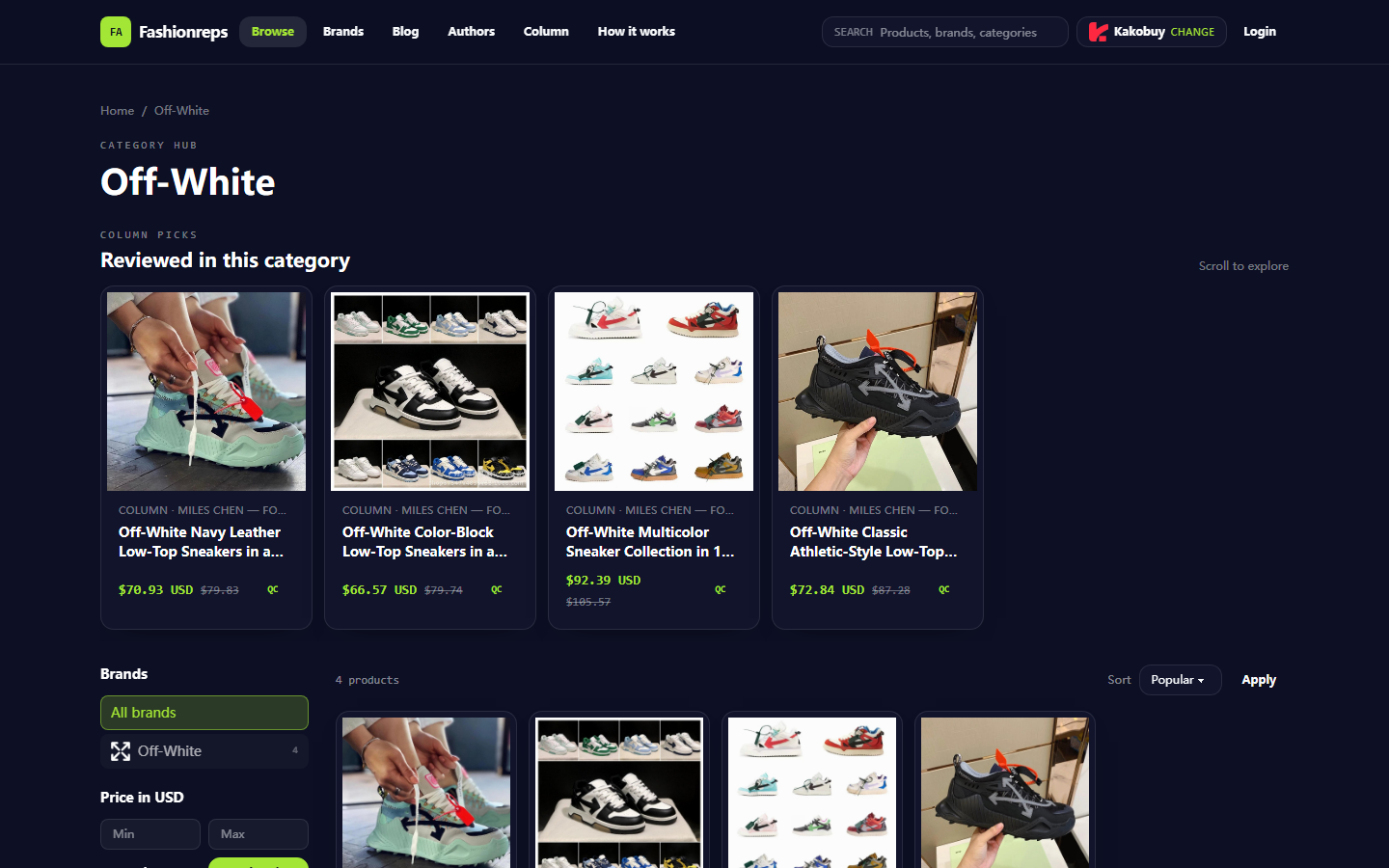
Currently visible Off-White category page shows 4 product samples, including Navy Leather Low-Top Sneakers, Color-Block Low-Top Sneakers, Multicolor Sneaker Collection, and Classic Athletic-Style Low-Top Sneakers. The page also shows partial descriptions such as sizes, upper material, or color counts, along with USD reference prices. Since prices, stock, and page status may change, when recording products, save the product name, page display time, and selected specifications, not just the discounted amount in screenshots.
How to Preserve Evidence of Coupon Status, Validity, and Claim Conditions
First, check coupon details on the platform where you actually use the coupon. The product discovery page on fashion-reps is not the same as the shopping agent's coupon center, and the page does not show current coupon codes, validity periods, or applicable thresholds that can be verified for this article, so no coupon promises can be derived from the product page.
Record in the following order:
- Coupon name or system-generated identifier. Do not share complete account information, payment card information, or order privacy with others.
- Claim time and displayed expiration time, noting whether the time zone is clear.
- Usage threshold, such as minimum product amount, specified category, specified agent, first order, or limited payment method.
- Exclusions, such as specific brands, specific products, shipping, service fees, taxes, or orders already participating in other promotions.
- Usage status, such as unclaimed, claimed, used, expired, or only displayed on the campaign page.
- Applicable store, product source, and checkout page.
If the coupon details do not specify the validity period, amount threshold, or exclusions, do not interpret "claimable" as "guaranteed discount on this order". A safer approach is to keep relevant prompts from the coupon details page and checkout page related to the coupon, covering name, address, phone, order number, and payment information if necessary. 📋
How to Check Order Amount, Service Fees, Payment Methods, and Product Restrictions Item by Item
Coupons often apply to a specified amount after meeting rules, not the single product price seen on the page. Check product subtotal, quantity, service fees, storage or handling fees, shipping, taxes, and other possible charges separately.
| Check Item | What to Confirm | What Not to Infer Directly |
|---|---|---|
| Product Amount | Whether it meets the threshold specified in coupon details, whether threshold is per item, product subtotal, or entire order | Product reference price reaching threshold does not mean agent checkout amount also reaches |
| Product Scope | Whether Off-White shoes fall into applicable category, whether specific product is excluded | Same brand, same shoe type, or same page does not mean identical rules |
| Fee Scope | Whether coupon only offsets product amount or also covers service fees, shipping, or other charges | Seeing a discount does not mean final amount decreases by same proportion |
| Payment Method | Whether specific payment method, currency, or account eligibility is required | Seeing coupon entry does not mean current payment method works |
| Usage Limit | Whether limited to new users, once per person, once per order, or once per campaign | Coupon still showing in account does not mean reusable |
If multiple products are in the cart, first create a test order containing only the target Off-White shoes. This eliminates other products triggering exclusions or changing the amount threshold. After confirming rules, decide whether to add other products.
How to Distinguish Different Reasons from Checkout Prompts and Undiscounted Amounts
Checkout page prompts are usually closer to the final judgment than product pages, but also distinguish different statuses:
- "Claimed" only means the coupon is in the account or coupon center, not applied to the current order.
- "Available" may still require meeting amount, category, payment method, or time conditions.
- "Applied" should show a corresponding deduction in the order fee breakdown, not just a button color change.
- "Conditions not met" usually indicates threshold, product scope, account eligibility, or payment method mismatch; need to check item by item.
- "Expired" or "Unavailable" should not be bypassed by refreshing repeatedly or guessing new coupon codes.
- When checkout amount does not change, rely on fee breakdown, not pop-up prompts, campaign banners, or product reference prices as actual deductions.
If the page shows the coupon applied but the order total does not change, first check whether the deduction only covers product subtotal or is offset by shipping, service fees, taxes, etc. If the fee breakdown still cannot explain the difference, pause submitting the order and save the page state, then contact the shopping agent's customer service that actually processes the order.
Review Order When Coupons Cannot Be Stacked, Already Used, or Not Applicable
When coupons cannot be stacked, first confirm whether the cart has automatically applied another promotion. There may be priority between different coupons; "available" on the page does not necessarily mean it can be used together with the current promotion.
Use the following review order:
- Delete other uncertain coupons or promotions, keep one coupon to test explicitly.
- Keep only the target Off-White shoes and confirmed specifications.
- Recheck product subtotal, quantity, and currency.
- Confirm time, threshold, category, account, and payment method conditions in coupon details.
- Enter checkout page, check whether fee breakdown shows a separate coupon deduction.
- If prompted already used, check whether consumed in an unsubmitted test checkout, or whether there are duplicate order records.
- If prompted not applicable, save the complete prompt text and current order conditions, then contact shopping agent customer service.
Do not buy unnecessary products to meet the threshold, and do not try to use coupons by splitting orders, fabricating information, or bypassing platform restrictions. If the nominal savings from a coupon is less than additional products, service fees, or shipping, actual expenses may increase. ⚠️
How to Rewrite as Verification Process When Target Site Has No Current Coupon Information
The currently provided fashion-reps page materials support verifying product categories, some shoe descriptions, and reference prices, but do not provide independently confirmable current coupon details. Therefore, regarding coupon codes, discount amounts, validity periods, minimum spend, and exclusions, it can only be written as a verification process, not as confirmed facts.
When publishing or saving coupon-related content, at least clearly record:
- Verification date: October 17, 2026.
- Verification platform: the shopping agent where the coupon is actually claimed and used, not just the product discovery page.
- Verification product: specific Off-White shoe model, color, size, and quantity.
- Verification currency: whether coupon threshold and final order use the same currency.
- Verification result: whether coupon details are visible, whether checkout actually deducts, and what the prompt text is.
If there is no new official or agent page information later, the article should maintain the "how to verify" wording and should not add unconfirmed coupon codes, countdowns, discount percentages, or "sitewide available" claims.
Conditions for Retrying, Contacting Customer Service, or Pausing After Troubleshooting
Situations where you can retry: coupon details clearly exist, order conditions are controllable, and checkout page does not show used or expired; in this case, only perform one documented recheck with the same order conditions to avoid creating duplicate orders continuously.
Situations to contact customer service: coupon details state available but fee breakdown has no deduction; prompts contradict coupon rules; or page shows applied but final amount unchanged. When contacting, provide only necessary coupon identifier, product name, order conditions, and masked screenshots; do not disclose complete order, passport, payment card, or full shipping label.
Situations to pause purchase: coupon validity cannot be confirmed; product or shopping agent page redirects, expires, or blanks; coupon requires unnecessary sensitive information; or you must purchase unneeded products to get the coupon. Pausing does not necessarily mean the product cannot be bought, but current evidence is insufficient to prove the coupon is worth additional conditions.
The final judgment should clearly state four points: estimated savings must be based on actual checkout page display; added risks may include additional product expenses, fee changes, coupon consumption, or duplicate orders; suitable for those willing to check rules item by item and already planning to buy the shoe; not suitable for those chasing uncertain discounts by adding items, splitting orders, or submitting unexplainable orders. ✅