Dior Page Color/Size Mismatch? fashionreps Troubleshooting
Introduction When browsing Dior products on fashion-reps, if the product images, color options, size options, or ordering entry points appear inconsistent, do not submit your order right away. This issue may stem from outdated page information, incomplete option loading, images corresponding to a different style, or simply a mismatch between the current product page and the external shopping agent page fields. This article addresses only one issue: Dior product page color or size options not mat
Editor score 4.2 / 5
Reading contents
Introduction
When browsing Dior products on fashion-reps, if the product images, color options, size options, or ordering entry points appear inconsistent, do not submit your order right away. This issue may stem from outdated page information, incomplete option loading, images corresponding to a different style, or simply a mismatch between the current product page and the external shopping agent page fields.
This article addresses only one issue: Dior product page color or size options not matching the images, title, or ordering page. After reading, you should be able to perform a verifiable step-by-step check and determine whether to proceed with confirmation, contact your shopping agent, or pause the operation. This article does not cover post-payment disputes, logistics anomalies, customs issues, or physical product quality authentication.

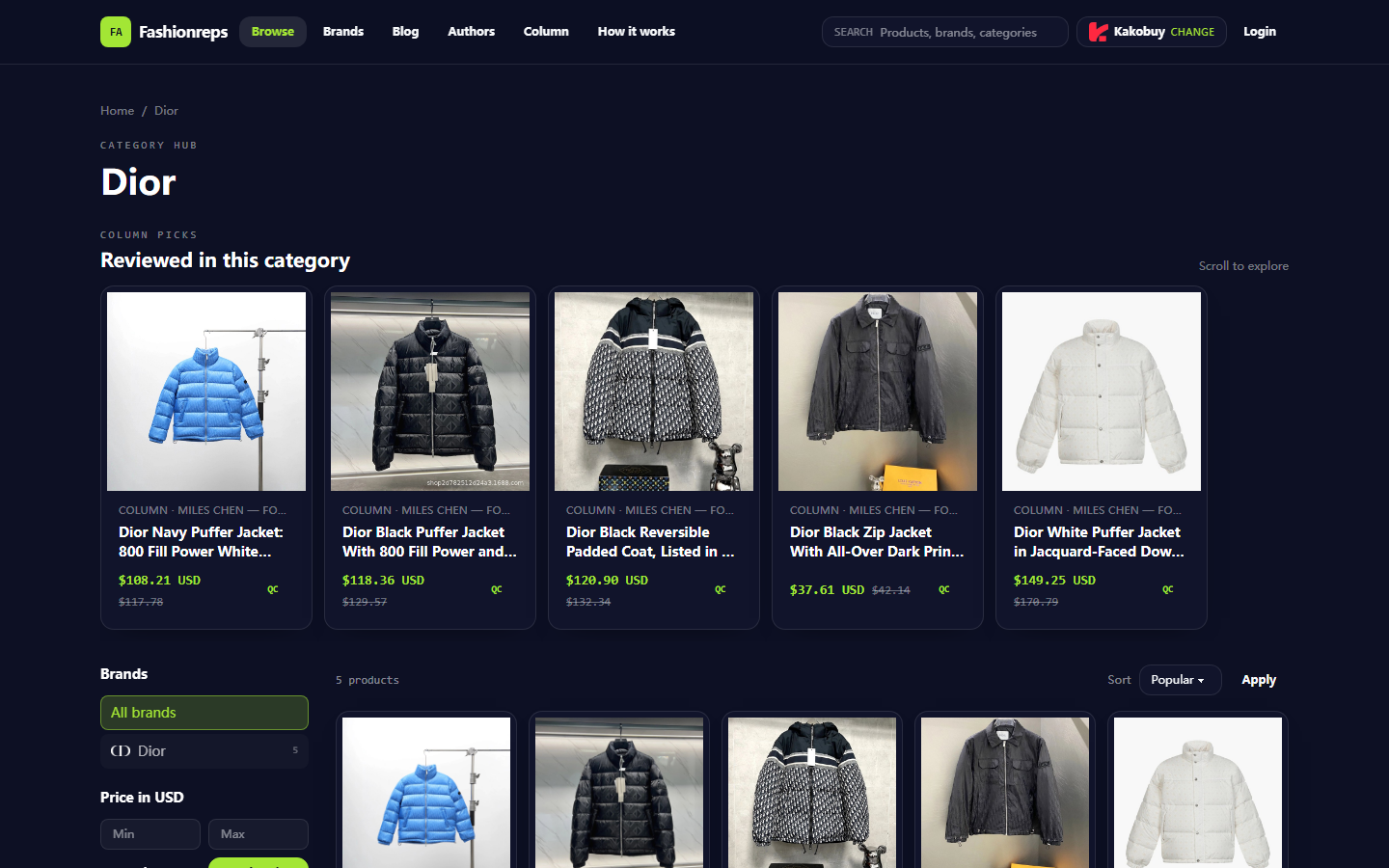
Image: Browsing entry on the Fashionreps Dior category page. For verification, rely on the real-time fields of the specific product page and its ordering agent page, not just the category thumbnails.
Dior product variant verification issue addressed in this article
"Option mismatch" typically manifests as one or more of the following:
- The title states one color, but the product image shows another.
- The image shows multiple colorways, but the options area displays only some of them.
- The product page shows a certain size range, but the selection box lacks some of those sizes.
- Colors or sizes are visible on the fashion-reps page, but after clicking Buy, the external shopping agent page does not have the corresponding options.
- The same color is referred to by different names in different places, such as black, dark black, or printed black, making it unclear if they refer to the same variant.
- Options appear to exist, but switching them does not change the image, price, or stock notice.
These symptoms alone do not prove a system failure on the product page, nor do they prove that the seller actually has all colors or sizes in stock. The verification date prior to publication was October 14, 2026; prices, stock, options, and external agent page statuses may change, so re-check before purchase.
First record the fashionreps product page title, images, and current link
Before any payment actions, save the minimal evidence that can pinpoint the issue. Do not screenshot only the options area, because without the title and page URL, it is hard to tell which product the screenshot belongs to.
Save the following in order:
- Product title and full product page URL.
- Main image, thumbnails, and detail images displayed on the page.
- Currently visible color, size, and other variant fields.
- Price, reference price, or stock notice, if shown.
- Time, time zone, and login status before clicking Buy.
- The name of the shopping agent that opens after clicking Buy, along with the product title and options on that agent page.
When taking screenshots, include the browser address bar, product title, and options area. Do not publicly share order numbers, names, phone numbers, shipping addresses, payment card information, or complete waybills. If a screenshot contains such details, redact them before saving.
Judge the category page and the specific product page separately. Category thumbnails only help locate the product; they cannot alone prove color, size, material, or stock. What truly needs verification is the specific product page and the shopping agent page that opens after clicking Buy.
Compare color, size, and other variant fields
Break the page content into individual fields; do not substitute "looks about the same" for a field-by-field check. Check in the following order:
| Verification field | What to confirm | What to do when mismatched |
|---|---|---|
| Product identity | Do the title, main image, and detail images point to the same style? | If the title or images clearly belong to a different style, pause variant selection |
| Color | Are the color name, swatch, selected state, and corresponding image consistent? | Record the page text as-is; do not merge similar colors on your own |
| Size | Are the size chart, selection box, available values, and measurement units consistent? | Do not infer missing options based on common sizes |
| Other fields | Do version, length, fabric, set contents, or accessory options change? | Only record as an optional variant if explicitly shown on the page |
| External agent page | Do the product title, images, colors, and sizes still correspond? | If core fields cannot be matched, pause ordering |
Color verification method
First look at the color name, then switch color options and observe whether the main image or detail images change accordingly. If the color name changes but the images stay exactly the same, either the images are not bound to variants, or different options share the same image set. In that case, record only "the page fails to prove that images change with color," not a direct judgment about the actual shipped color.
If the page uses color swatches without text names, save the swatch order and selected state, and re-verify on the shopping agent page. Do not visually lump dark blue, black, navy, or printed colors into the same item.
Size verification method
First confirm whether sizes are letter sizes, numeric sizes, or seller-defined codes. Then check if there is a size chart with measurements like chest, length, shoulder, sleeve, etc. If the product page only offers S, M, L, do not assume these correspond to a national standard.
If the product page shows S–3XL but the selection box only includes some sizes, record the "title range" and the "currently selectable range" separately. A difference does not necessarily mean zero stock; it could be incomplete page data loading. Without further evidence, do not fill in missing sizes on behalf of the seller.
Check whether page images and options belong to the same product
When images and options mismatch, first rule out misjudgment caused by page structure:
- Check whether the image belongs to the same product card, not a recommended or adjacent product.
- Check whether the product title stays consistent after swiping left/right or switching thumbnails.
- Check whether the selected state of the option actually changes after switching colors.
- Check whether selecting a size triggers changes in price, stock, or notice text.
- After reloading the page, observe whether options reappear, decrease, or change order.
- Use an incognito window or another browser for a read-only check, but do not submit orders repeatedly.
If the page becomes consistent after a refresh, it may be a temporary loading issue; if the same mismatch appears on every refresh, treat it as a persistent page data problem. In either case, do not take any single refreshed display as the seller's long-term stock commitment.
Distinguish between missing information, loading anomalies, and true mismatches
You can judge severity in three tiers.
Tier one is missing information. The page does not provide enough fields, for example only product images with no color names or size chart. In this case, variant confirmation cannot be completed; mark as "insufficient evidence" rather than guessing.
Tier two is loading anomaly. The options area is blank, a long spinner after switching, fields appear and disappear after refresh, or the same page shows different content in different sessions. Record the occurrence time, browser environment, and page state, then wait for the page to stabilize or contact page support.
Tier three is a true mismatch. Title, images, color, and size fields remain in conflict even after stable loading, or the fashion-reps page and the external shopping agent page persistently show different product information. This cannot be resolved by guessing, especially not by swapping a visible size for another "closest" size.
A simple rule of thumb: if you cannot explain, using screenshots and page text, "which variant was selected, which image corresponds to that variant, and whether the external agent page retains the same selection," you have not completed pre-order verification.
Save screenshots, links, and verification time as review evidence
Keep a brief record for each verification, including:
- fashion-reps product page URL.
- External shopping agent page URL or page identifier.
- Original product title text.
- Original color and size text.
- Screenshots of the page and agent page.
- Verification time, with time zone.
- Browser or device environment used.
- The specific discrepancy you found, rather than a vague "page is wrong."
For example, write "fashion-reps page shows black and navy, but after clicking Buy, the agent page shows only black; product title and main image are currently the same," not "color issue." Specific descriptions help support staff review and reduce repetitive explanations.
If the page content later changes, do not overwrite the original screenshot. Keep the original file and note the re-check time and what changed in a new record. This helps distinguish page updates, temporary loading issues, and persistent data errors.
When to pause ordering and contact official support
Pause selection or payment in any of the following situations:
- Color name clearly does not match the main image, and switching colors does not change the image.
- Target size appears in the title or size chart but not in the current selection box.
- Product title or variant fields on fashion-reps page and external shopping agent page cannot be matched.
- Price, color, or size changes repeatedly after refresh, making the final selection uncertain.
- The page requires adding missing variants via text notes, but it is not clearly stated whether the seller accepts that method.
- You cannot confirm which agent page or which product the Buy button opens.
Contact channels should be chosen based on where the issue occurs. If the fashion-reps page itself lacks fields or the link points abnormally, provide feedback through that site's public support channel, attaching screenshots without sensitive personal information. If, after clicking Buy, the external shopping agent page shows inconsistent colors, sizes, or product information, contact the selected shopping agent's official customer service, because orders, payments, and shipping are handled by the external agent.
Do not use public comment sections as an official variant confirmation channel, nor ask other users to guess sizes for you. If support personnel cannot confirm the corresponding variant based on product identifiers and screenshots, continue to hold.
Post-verification next-step checklist
Only proceed if all the following conditions are met simultaneously:
- Product title and main image belong to the same style.
- Target color has a clear name or identifiable option.
- Target size is in the current selectable list and does not clearly conflict with the size chart.
- After clicking Buy, the external shopping agent page still retains the same product and same variant.
- Page state is stable; core fields do not change randomly after refresh.
- You have recorded the verification time and kept necessary screenshots.
If all are met, you can proceed to review the final amount, service fees, warehouse inspection options, and return/exchange rules on the shopping agent page. If only some are met, do not replace missing evidence with notes, verbal guesses from customer service, or similar product images.
Finally, understand the cost and risk of this verification: spending a few extra minutes recording pages and confirming variants may lead to missing short-term price or stock changes; but the risk of ordering directly is receiving the wrong color or size and only then realizing the page evidence was insufficient, potentially bearing return, reshipment, warehousing, or international shipping costs. This process suits Dior items where color or size choice greatly affects the outcome, and buyers who plan to order through external shopping agents. It is not advisable to repeatedly refresh or create duplicate orders when page fields are already stable and fully consistent, nor to proceed with payment when core variants remain unconfirmed. ✅
Conclusion
When color or size options on a fashion-reps product page appear inconsistent, the safest approach is not to guess but to map product identity, color, size, images, and the external agent page item by item. If any one item lacks clear evidence, save records and pause. This reduces the risk of selecting the wrong variant and ensures follow-up support communication is based on concrete page facts. 🔎